
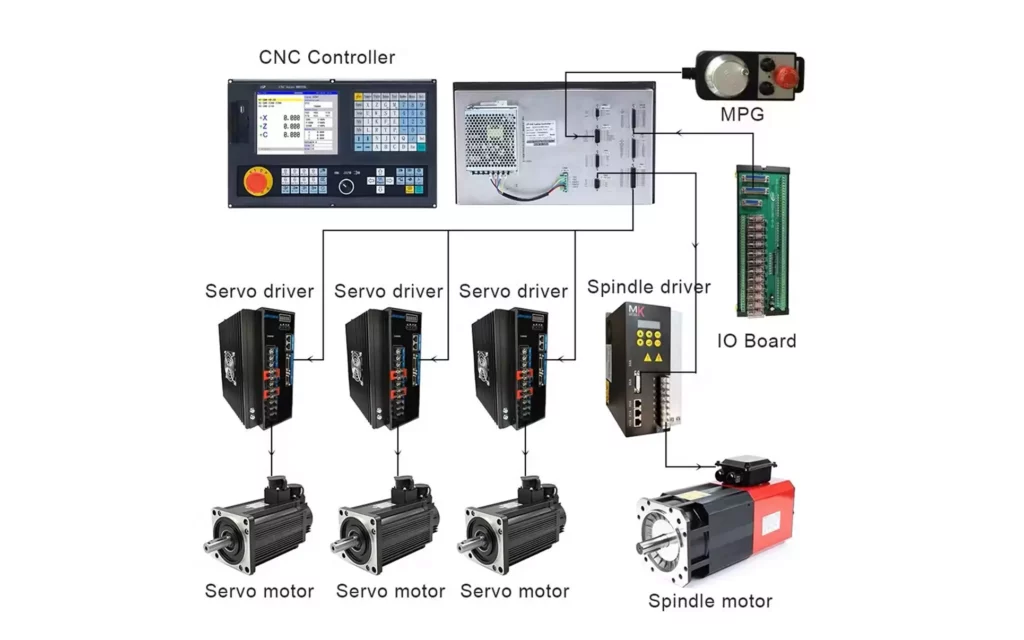
In the world of modern manufacturing, precision is not just a goal; it is a requirement. From the aerospace components that keep planes in the sky to the microscopic parts found in medical devices, the consistency and accuracy of production are paramount. At the heart of this precision lies the Computer Numerical Control (CNC) machine. While the robust mechanical structure, the spinning spindles, and the sharp cutting tools often grab the visual attention, there is a silent, invisible conductor orchestrating every movement, every cut, and every safety check. This conductor is the Control Unit.
The CNC control unit is often referred to as the “brain” of the machine. Without it, a CNC mill or lathe is nothing more than an expensive paperweight a collection of steel and motors with no direction. Understanding the control unit is essential for machinists, engineers, and manufacturing business owners who wish to optimize production, troubleshoot errors, and invest in the right technology for their needs.
In this comprehensive guide, we will dissect the CNC control unit. We will explore its architecture, how it processes information, the different types available in the market, and where the technology is heading in the age of Industry 4.0.
What is a CNC Control Unit?
To understand the control unit, we must first contextualize it within the CNC ecosystem. CNC stands for Computer Numerical Control. It is a manufacturing process where pre-programmed computer software dictates the movement of factory tools and machinery. The Control Unit, often technically referred to as the Machine Control Unit (MCU), is the hardware and software system that reads these programs and converts them into physical actions.
From NC to CNC
Historically, manufacturing relied on manual control or Numerical Control (NC) systems that used punch tapes. These early systems were rigid; if a mistake was found in the tape, the entire tape often had to be repunched. The evolution to Computer Numerical Control introduced a microcomputer into the control loop. This allowed for programs to be stored in memory, edited on the fly, and executed with vastly superior computational power.
The control unit is the interface between the human operator (or the CAM software) and the physical machine. It accepts input, typically in the form of G-code and M-code, processes this data through complex algorithms, and outputs electrical signals to drive the machine’s motors and actuators.
Hardware vs. Software
It is important to distinguish that the control unit is not just a computer screen. It is a symbiotic relationship between hardware and software.
- The Hardware: Includes the Central Processing Unit (CPU), memory chips, input/output (I/O) ports, power supply, and the physical operator panel (buttons, knobs, emergency stops).
- The Software: Includes the Real-Time Operating System (RTOS), the interpreter that reads G-code, the logic controllers, and the Human Machine Interface (HMI) that the operator sees on the screen.
Together, they form a dedicated industrial computer designed to withstand the harsh environments of a machine shop, including vibration, temperature fluctuations, and electromagnetic interference.
Core Components of the Control Unit
To appreciate the complexity of the CNC control unit, we need to look under the hood. A modern MCU is a sophisticated assembly of several critical subsystems, each with a specific role.
1. The Central Processing Unit (CPU)
The CPU is the calculation engine. In a standard office computer, the CPU handles diverse tasks like browsing the web and word processing. In a CNC control unit, the CPU is dedicated to real-time mathematical calculations. It must calculate tool paths, manage velocity profiles, and process feedback data thousands of times per second. If the CPU lags, the machine stutters, leading to poor surface finish or even tool breakage. High-end controllers often use multi-core processors to dedicate specific cores to motion control and others to the user interface.
2. Memory (Storage and RAM)
CNC programs can range from a few kilobytes to hundreds of megabytes, especially in 5-axis machining with complex surface contours. The control unit requires two types of memory:
- Volatile Memory (RAM): Used for active processing. It holds the current block of code being executed and the temporary data regarding machine position.
- Non-Volatile Memory: Used for storing part programs, tool offset data, and machine parameters. Even when the machine is powered off, this data must be retained. Modern units use flash memory or solid-state drives, whereas older units relied on bubble memory or hard drives.
3. Input/Output (I/O) Interfaces
The machine tool is not just about moving axes. It involves coolant pumps, tool changers, door locks, chip conveyors, and safety lights. The I/O interface manages these auxiliary functions. It receives signals from sensors (e.g., “door is closed”) and sends signals to actuators (e.g., “turn on coolant”). This is often managed by an integrated Programmable Logic Controller (PLC).
4. The Programmable Logic Controller (PLC)
While the CPU handles motion, the PLC handles logic. It is the safety and utility manager. For example, the motion controller might say “move the spindle to position X,” but the PLC ensures that the spindle is actually clamped, the lubrication pressure is sufficient, and the safety guard is down before allowing the movement. In many CNC architectures, the PLC is integrated directly into the control unit, creating a seamless link between motion and machine logic.
5. Drive Interface and Feedback Systems
The control unit does not power the motors directly; it sends low-voltage command signals to external or internal drive amplifiers. These amplifiers then provide the high current needed to turn the servo or stepper motors. Crucially, the control unit must know where the motors are. It interfaces with feedback devices like encoders or resolvers mounted on the motors or the machine scales. This creates a “closed-loop” system where the controller constantly compares the commanded position with the actual position and makes micro-corrections.
6. Human Machine Interface (HMI)
This is what the operator interacts with. It includes the monitor, the keyboard, the jog wheel, and the emergency stop button. Modern HMIs are graphical, touch-screen interfaces that allow operators to visualize the tool path in 3D, monitor load meters, and access diagnostic data. A well-designed HMI reduces operator error and shortens the learning curve.
How the Control Unit Works: The Workflow
Understanding the components is one thing; understanding how they interact in real-time is another. The workflow of a CNC control unit can be broken down into a cycle that happens continuously, often hundreds of times per second.
Step 1: Input and Decoding
The process begins when a part program is loaded into the control unit. This program is written in G-code (ISO standard) or a proprietary language. The control unit reads the code line by line (or block by block).
- Example:
G01 X100 Y50 F200 - Decoding: The controller interprets
G01as a linear interpolation move,X100 Y50as the target coordinates, andF200as the feed rate.
Step 2: Interpolation
This is the mathematical heart of the CNC controller. The machine cannot simply jump from point A to point B; it must move smoothly along a path. Interpolation is the process of calculating the intermediate points between the start and end coordinates.
- Linear Interpolation: Calculates points along a straight line.
- Circular Interpolation: Calculates points along an arc or circle.
- Helical Interpolation: Used for threading or milling holes, combining circular motion with linear axial motion.
The controller breaks these paths down into tiny segments. For a high-speed machine, the look-ahead function is vital. The controller reads dozens of blocks ahead to anticipate sharp corners. If it sees a sharp turn coming, it will slow down the feed rate before reaching the corner to prevent overshooting and maintain accuracy, then accelerate back up after the turn.
Step 3: Servo Control and Signal Generation
Once the path is calculated, the control unit sends position and velocity commands to the servo drives. This is usually done via analog voltage signals (older systems) or digital bus systems like Ethernet/IP, Profinet, or Mechatrolink (newer systems). The drive converts this command into electrical current to power the motor windings.
Step 4: Feedback and Correction
As the motor turns, the encoder sends pulses back to the control unit. The controller counts these pulses to determine the exact position of the axis.
- Closed-Loop System: The controller compares the commanded position with the actual position. If there is a discrepancy (following error), the controller increases the signal to the motor to correct it.
- Open-Loop System: Common in stepper motor systems, there is no feedback. The controller assumes the motor moved as commanded. This is cheaper but less reliable for high-precision or high-load applications.
Step 5: Execution and Monitoring
While the axes move, the PLC component of the control unit monitors the machine state. Is the spindle speed stable? Is the coolant flowing? If a limit switch is triggered or the motor draws too much current (indicating a crash or dull tool), the control unit initiates an emergency stop sequence to protect the machine and the workpiece.
Types of CNC Control Systems
Not all control units are created equal. The market is segmented based on architecture, capability, and cost. Choosing the right controller is often more important than choosing the machine structure itself.
1. Proprietary (Closed) Systems
These are the industry standards, manufactured by companies that specialize in control technology. They are known for reliability, robustness, and deep integration with machine tools.
- Fanuc: The global market leader. Known for extreme durability and longevity. Fanuc controls are found on a vast majority of industrial CNC machines. They are often criticized for dated user interfaces but praised for never failing.
- Siemens (Sinumerik): A European powerhouse. Siemens controls are known for advanced functionality, excellent 5-axis capabilities, and a more modern, PC-like interface. They are highly customizable.
- Heidenhain: A German company renowned for precision. Heidenhain controls are often the choice for high-end mold and die makers. They feature conversational programming (programming directly at the machine without CAM software) that is incredibly intuitive.
- Haas: Haas Automation builds both the machine and the control. Their proprietary control is designed specifically for their machines, offering a good balance of ease-of-use and cost-effectiveness, though it is generally less powerful than high-end Fanuc or Siemens units for complex 5-axis work.
2. PC-Based (Open) Systems
With the rise of powerful personal computers, some control systems utilize standard PC hardware running a real-time operating system.
- LinuxCNC: An open-source software solution that turns a PC into a CNC controller. It is popular among hobbyists and research institutions due to its low cost and flexibility.
- Mach3/Mach4: Software that runs on Windows, using a parallel port or Ethernet motion card to control stepper or servo drivers. Common in the hobbyist and light industrial sector.
- Advantages: Lower hardware cost, easy connectivity to networks, modern graphics.
- Disadvantages: Windows is not a real-time OS (unless patched), which can lead to latency issues. PCs are less robust against shop floor dust, vibration, and electrical noise compared to proprietary industrial controllers.
3. Soft CNC
This is a hybrid approach where the control software runs on an industrial PC, but the motion control is handled by a dedicated hardware card. This offers the flexibility of a PC with the reliability of dedicated hardware. Many modern “open architecture” controllers from major brands fall into this category, allowing users to run custom applications alongside the standard control software.
Key Functions and Advanced Capabilities
Beyond basic motion, modern control units offer a suite of advanced features that define the capability of the machine.
Tool Management and Compensation
No tool is perfectly sharp, and no tool holder is perfectly aligned. The control unit manages Tool Length Offsets and Cutter Radius Compensation. The operator measures the tool, inputs the dimensions into the control, and the software automatically adjusts the path to account for the tool’s geometry. Advanced units can even monitor tool wear and suggest replacements.
Error Compensation
Machines are not perfect. A ball screw might have a slight pitch error, or the guideways might not be perfectly square. High-end control units allow for Volumetric Compensation. Using a laser interferometer, the machine’s errors are mapped, and the control unit applies inverse corrections in real-time to ensure the part is accurate despite the machine’s mechanical imperfections.
Look-Ahead Processing
As mentioned in the workflow, look-ahead is critical for high-speed machining. Advanced controllers can look ahead 100 to 1000 blocks of code. This allows for smoother acceleration and deceleration, reducing “jerk” (the rate of change of acceleration). This results in better surface finishes and less wear on the machine mechanics.
Connectivity and Data Collection
In the past, loading a program required a floppy disk or a direct cable connection. Modern control units are networked nodes. They support Ethernet, Wi-Fi, and USB. They can pull programs directly from a central server (DNC). More importantly, they can push data out. They can report machine status, cycle times, and alarm history to a central Manufacturing Execution System (MES).
Safety Integrated
Safety is no longer just a physical emergency stop button. Modern controls have Safe Torque Off (STO) and safety-rated monitoring. The control can monitor safety doors, light curtains, and spindle orientation. If a safety breach occurs, the control cuts power to the drives in a specific, safe manner defined by international safety standards (like ISO 13849).
Troubleshooting and Maintenance of Control Units
Even the most robust control units require care. A significant portion of CNC downtime is attributed to control system issues rather than mechanical failures.
Common Issues
- Battery Failure: The memory that holds machine parameters and offsets is often backed up by a battery. If this battery dies while the machine is off, the machine can “forget” its parameters, leading to a catastrophic loss of functionality. Regular battery replacement schedules are vital.
- Electrical Noise: CNC machines generate significant electromagnetic interference (EMI). Poor grounding or damaged shielding can cause the control unit to receive false feedback signals, resulting in erratic movement or “following error” alarms.
- Overheating: Control cabinets have cooling fans and air conditioning units. If filters are clogged, the electronics can overheat, causing the system to throttle performance or shut down.
- Software Corruption: Sudden power loss during a software update can corrupt the operating system. Always use Uninterruptible Power Supplies (UPS) for CNC machines.
Maintenance Best Practices
- Cleanliness: Keep the control panel and cabinet clean. Dust is conductive and can short-circuit boards.
- Backups: Regularly back up all machine parameters, PLC programs, and tool offsets. This “image” of the machine can save days of downtime if a board needs replacement.
- Cable Management: Ensure cables connecting the control unit to the drives and motors are secure and free from abrasion. Vibration can loosen connections over time.
- Updates: Keep the firmware updated. Manufacturers often release patches that fix bugs or improve motion algorithms. However, always test updates carefully before deploying them to production machines.
The Future of CNC Control Units
We are currently standing on the brink of the fourth industrial revolution, Industry 4.0, and the CNC control unit is evolving rapidly to meet these new demands.
Artificial Intelligence and Adaptive Control
Future control units will not just execute code; they will optimize it. Adaptive Control systems already exist, where the controller monitors spindle load and adjusts the feed rate in real-time to maintain optimal cutting conditions. With AI, the controller could learn from past jobs. It might recognize that a specific tool vibrates at a certain depth of cut and automatically adjust the parameters to prevent chatter, effectively “learning” the machine’s behavior.
Digital Twins
A Digital Twin is a virtual replica of the physical machine. Advanced control units will sync with a digital twin in the cloud. Before a program is run on the physical machine, it can be simulated on the twin to check for collisions or inefficiencies. The control unit can then download the verified program with confidence. This reduces setup time and eliminates the risk of crashing expensive machines.
Cloud Connectivity and Remote Monitoring
The control unit of the future is fully cloud-integrated. Manufacturers will be able to monitor a fleet of machines across different continents from a single dashboard. Predictive maintenance will become standard; the control unit will analyze vibration and temperature data to predict a bearing failure weeks before it happens, allowing maintenance to be scheduled during non-production time.
Additive and Subtractive Hybridization
As hybrid machines that combine 3D printing (additive) and CNC machining (subtractive) become more common, control units will need to manage two vastly different processes simultaneously. The software architecture will need to handle the thermal dynamics of welding or printing alongside the precision motion of cutting, all within the same coordinate system.
Voice and Gesture Control
While likely supplementary, HMIs may evolve to include voice commands for common tasks (“Load Program 101,” “Turn on Coolant”) or gesture controls for viewing 3D models, reducing the need for physical button pressing in dirty environments.
Selecting the Right Control Unit for Your Application
For business owners and engineers, selecting a machine often comes down to selecting the control. Here are a few considerations:
- Complexity of Parts: If you are cutting simple 2D profiles, a basic controller is sufficient. For complex 5-axis aerospace parts, you need a high-end controller with advanced look-ahead and spline interpolation (like Siemens 840D or Fanuc 31i).
- Operator Skill Level: If your workforce is less experienced, a controller with conversational programming (like Heidenhain or Haas) can reduce reliance on external CAM programmers.
- Support and Ecosystem: Choose a brand that has strong local support. If a board fails, can you get a replacement in 24 hours? Are there local technicians trained to service that specific control?
- Integration Needs: If you are building a smart factory, ensure the control unit supports the communication protocols (MTConnect, OPC UA) required by your network infrastructure.
Frequently Asked Questions (FAQ)
Q: Can I upgrade the control unit on an old CNC machine?
A: Yes, this is known as a “retrofit.” It is often more cost-effective than buying a new machine. However, it requires careful integration of new drives, motors, and wiring. It extends the life of the machine and adds modern features.
Q: What is the difference between a CNC Controller and a PLC?
A: The CNC Controller focuses on motion (axes, spindles, tool paths). The PLC focuses on logic (switches, pumps, safety interlocks). In modern machines, they are often housed in the same unit but function as distinct logical processors.
Q: Why are CNC controls so expensive?
A: You are paying for reliability and real-time performance. A standard PC might crash once a month; a CNC control is designed to run 24/7 for 20 years without a glitch in harsh environments. The R&D for motion algorithms is also significant.
Q: Is G-code universal?
A: Mostly. The basic G-codes (G00, G01, G02) are standard. However, advanced features and macro programming vary significantly between Fanuc, Siemens, and Heidenhain. A program written for one may not run on another without modification.
Conclusion
The Control Unit in a CNC machine is far more than a simple interface; it is the nexus where digital design meets physical reality. It is a marvel of engineering that combines high-speed computing, precise motion algorithms, and robust industrial logic to create the products that define our modern world.
From the humble beginnings of punch tapes to the AI-driven, cloud-connected systems of the future, the evolution of the CNC control unit mirrors the evolution of manufacturing itself. For machinists, understanding the control unit unlocks the ability to push the machine to its limits safely. For engineers, it offers the tools to design parts that were previously impossible to manufacture. For business leaders, it represents the key to efficiency, data integration, and competitive advantage.
As we move further into the era of smart manufacturing, the control unit will continue to gain intelligence. It will become more predictive, more connected, and more autonomous. However, the fundamental purpose remains unchanged: to translate a vision into a tangible object with unwavering precision. Whether you are operating a vintage mill or a state-of-the-art 5-axis machining center, respecting and understanding the brain of the machine is the first step toward manufacturing excellence.
In the end, the steel and the cutters do the work, but the control unit does the thinking. And in the high-stakes world of precision manufacturing, thinking clearly is everything.


