
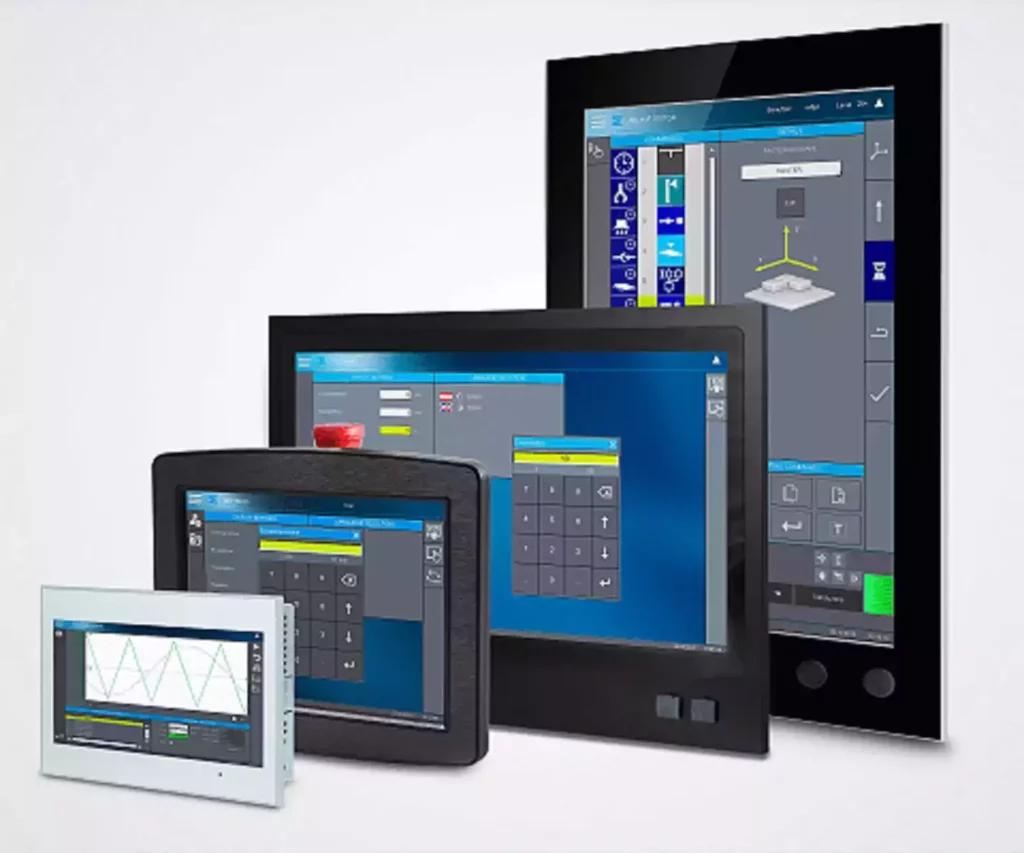
In today’s rapidly evolving technological landscape, the interaction between humans and machines has become more critical than ever. This is where the concept of Human-Machine Interface (HMI) comes into play a vital tool that enables seamless communication between people and machines. Whether it’s in industrial automation, automotive systems, healthcare devices, or consumer electronics, HMIs are at the heart of modern technology.
What is a Human-Machine Interface?
A Human-Machine Interface (HMI) refers to the hardware or software that allows humans to interact with machines, systems, or devices. It acts as a bridge, translating human commands into machine-readable data and vice versa. Simply put, an HMI is any interface that facilitates two-way communication between a person and a machine.
HMIs can take many forms, including touchscreens, buttons, switches, voice commands, gesture recognition, or even augmented reality displays. The primary goal of an HMI is to make complex systems easier to understand and control, ensuring efficiency, safety, and user satisfaction.
Key Components of an Human Machine Interface
- Input Devices: These allow users to send instructions or data to the machine. Examples include keyboards, mice, touchscreens, sensors, and voice recognition systems.
- Output Devices: These provide feedback from the machine to the user. Common output devices include monitors, LED indicators, speakers, and haptic feedback systems.
- Software: Modern HMIs often rely on sophisticated software to process inputs, display outputs, and manage interactions. This software can range from simple graphical interfaces to advanced AI-driven systems.
- Communication Protocols: To ensure smooth interaction, HMIs use various communication protocols such as Ethernet, Modbus, OPC UA, or CAN bus to exchange information between the user and the machine.
Applications of Human Machine Interface
- Industrial Automation: In manufacturing plants, HMIs are used to monitor and control production processes. Operators can adjust settings, view real-time data, and troubleshoot issues through intuitive dashboards.
- Automotive Industry: Modern cars come equipped with advanced HMIs like infotainment systems, navigation tools, and driver-assistance features. Voice-activated controls and heads-up displays enhance convenience and safety.
- Healthcare: Medical equipment such as MRI machines, ventilators, and patient monitoring systems rely on HMIs to provide accurate and actionable information to healthcare professionals.
- Consumer Electronics: Smartphones, smart home devices, and wearable tech all incorporate HMIs to enable users to interact with technology effortlessly.
- Aviation & Aerospace: Pilots depend on HMIs for critical tasks like navigation, instrument readings, and system diagnostics, ensuring safe and efficient flight operations.
Benefits of Effective Human Machine Interfaces
- Improved Efficiency: Well-designed HMIs reduce the time and effort required to operate machines, leading to increased productivity.
- Enhanced Safety: Clear and intuitive interfaces help prevent errors by providing timely alerts and warnings.
- Better User Experience: A user-friendly HMI ensures that even non-experts can interact with complex systems without difficulty.
- Data Visualization: HMIs often include graphical representations of data, making it easier for users to interpret trends and make informed decisions.
Challenges in Designing Human Machine Interface (HMIs)
While HMIs offer numerous advantages, designing them effectively presents several challenges:
- Complexity vs. Simplicity: Striking the right balance between functionality and ease of use is crucial. Overly complicated interfaces can overwhelm users, while overly simplistic ones may lack necessary features.
- Adaptability: As technology evolves, HMIs must remain flexible enough to integrate new technologies and adapt to changing user needs.
- Accessibility: Ensuring that HMIs are accessible to individuals with disabilities requires careful consideration of design principles like universal access and assistive technologies.
- Security: With increasing connectivity, securing HMIs against cyber threats becomes paramount to protect sensitive data and maintain operational integrity.
The Future of HMIs
As artificial intelligence, machine learning, and IoT continue to shape the future of technology, HMIs will become even more intelligent and responsive. We can expect advancements such as:
- Natural Language Processing (NLP): Enabling seamless voice-based interactions with machines.
- Augmented Reality (AR): Overlaying digital information onto the physical world to enhance decision-making.
- Predictive Analytics: Using AI to anticipate user needs and provide proactive assistance.
- Gesture Control: Allowing users to interact with machines using hand movements or other gestures.
Conclusion
Human-Machine Interfaces have revolutionized the way we interact with technology, transforming industries and improving our daily lives. By bridging the gap between humans and machines, HMIs empower us to harness the full potential of modern technology while maintaining control over increasingly complex systems. As innovation continues to accelerate, the role of HMIs will only grow more significant, shaping the future of how we live, work, and communicate with the world around us.
Top 5 UX Principles for Industrial Dashboard Design
In industrial environments from manufacturing floors to energy plants and logistics centers dashboards are more than just pretty interfaces. They’re critical tools that operators rely on to monitor complex systems, make split-second decisions, and maintain safety standards. A poorly designed industrial dashboard doesn’t just frustrate users; it can lead to costly errors, downtime, or even dangerous situations.
Yet, many industrial dashboards still suffer from information overload, confusing layouts, and outdated design patterns. As Industry 4.0 transforms how we work, the need for intuitive, human-centered dashboard design has never been greater.
Here are the top 5 UX principles that will help you create industrial dashboards that are not only functional but truly effective.
1. Prioritize Clarity Over Complexity
The Principle: In industrial settings, every second counts. Operators need to grasp the status of systems at a glance. Cluttered interfaces with unnecessary elements slow down decision-making and increase cognitive load.
How to Apply It:
- Use clear, concise labels instead of technical jargon where possible
- Limit data points to what’s essential for the specific user role
- Employ whitespace strategically to separate different sections and reduce visual noise
- Choose simple, recognizable icons over decorative graphics
Example: Instead of displaying 20 different metrics on one screen, create role-based views. A maintenance technician might need vibration data and temperature readings, while a production manager focuses on throughput and efficiency KPIs.
2. Design for Real-Time Awareness
The Principle: Industrial operations are dynamic. Dashboards must reflect the current state of systems accurately and update in real-time, allowing operators to respond immediately to changes or anomalies.
How to Apply It:
- Implement visual indicators for status changes (color shifts, animations, alerts)
- Use progressive disclosure to show high-level status first, with drill-down options for details
- Establish clear alert hierarchies (critical, warning, informational) with distinct visual treatments
- Ensure update frequencies match the criticality of the data (sub-second for safety systems, minutes for trend data)
Example: A temperature gauge that smoothly transitions from green to yellow to red as thresholds are approached, accompanied by a subtle pulse animation when entering a warning zone, gives operators immediate situational awareness without requiring them to read exact values.
3. Establish Clear Information Hierarchy
The Principle: Not all information is equally important. A well-designed dashboard guides the user’s eye to the most critical information first, then supports deeper exploration as needed.
How to Apply It:
- Use size, color, and placement to indicate importance (critical metrics larger and positioned top-left)
- Group related information logically using cards, sections, or zones
- Apply the “F-pattern” or “Z-pattern” layout principles that match natural eye movement
- Create consistent visual patterns so users know where to find specific types of information across different screens
Example: In a manufacturing dashboard, overall equipment effectiveness (OEE) might be displayed prominently at the top, with underlying components (availability, performance, quality) shown below, and individual machine statuses arranged in a grid beneath that.
4. Maintain Consistency and Follow Standards
The Principle: Industrial operators often work across multiple systems and shifts. Consistent design patterns and adherence to industry standards reduce training time, minimize errors, and create muscle memory for critical tasks.
How to Apply It:
- Standardize color meanings across all dashboards (red always means stop/danger, green means normal)
- Use familiar industrial symbols and conventions (ISA symbols, P&ID standards)
- Create a design system with reusable components, typography, and interaction patterns
- Align with regulatory requirements and industry-specific guidelines (ISO, IEC standards)
Example: If a “stop” button is red and circular on one screen, it should never be green and square on another. Similarly, alarm conventions should follow ISA-18.2 or similar standards to ensure operators trained in one facility can work safely in another.
5. Design for Error Prevention and Recovery
The Principle: In industrial environments, mistakes can have serious consequences. Good UX doesn’t just make systems easy to use—it actively prevents errors and provides clear paths to recovery when things go wrong.
How to Apply It:
- Require confirmations for critical actions (shutdowns, parameter changes)
- Provide clear, actionable error messages that explain what happened and how to fix it
- Implement undo/rollback capabilities where possible
- Use constraints and validation to prevent invalid inputs
- Design for stress scenarios with larger touch targets, high contrast, and simplified flows for emergency situations
Example: When an operator attempts to override a safety limit, the system should require a two-step confirmation, display the potential consequences clearly, log the action with user identification, and provide an easy way to revert to safe parameters if needed.
Putting It All Together
Great industrial dashboard design isn’t about making things look pretty it’s about creating tools that enhance human capability, support critical decision-making, and keep people and processes safe. By applying these five principles, you’ll create dashboards that:
- Reduce operator cognitive load
- Speed up response times
- Minimize errors
- Improve training efficiency
- Enhance overall operational performance
Remember: The best way to validate your dashboard design is through user testing with actual operators in realistic conditions. Their feedback will reveal insights that no design guideline can predict.
Top 5 HMI Brands: Comprehensive Guide with Models and Pricing
When it comes to industrial automation, choosing the right Human-Machine Interface (HMI) is crucial for operational efficiency, safety, and user experience. Based on market leadership, innovation, and reliability, here are the top 5 HMI manufacturers dominating the industry, complete with their product lines, key models, and acquisition costs in US Dollars.
1. SIEMENS 🇩🇪
Company Overview
Siemens is a global leader in industrial automation, offering robust, scalable HMI solutions seamlessly integrated with their comprehensive automation ecosystem. Their SIMATIC HMI product line is renowned for its excellence in manufacturing, process industries, and infrastructure.
Product Lines & Models
SIMATIC HMI Basic Panels
- Designed for simple HMI applications with an excellent price-to-performance ratio.
- Available in 4″, 7″, 9″, and 12″ display sizes.
- KTP400 Basic (4.3″): ~$210
- KTP700 Basic (7″): ~$400
- KTP900 Basic (9″): ~$550
- TP1200 Basic (12″): ~$750
SIMATIC HMI Comfort Panels
- Advanced features, higher resolution, and scripting capabilities for complex applications.
- KP400 Comfort (4″, keypad): ~$370
- TP700 Comfort (7″, touchscreen): ~$900
- TP1500 Comfort (15″, touchscreen): ~$1,800+
SIMATIC HMI Unified Panels
- The latest generation featuring advanced usability, web-based engineering, and multi-touch capabilities (4″ to 12″ sizes).
Price Range: $200 – $3,000+
Best For: Integrated Siemens PLC environments, large-scale industrial applications, and facilities requiring a unified automation ecosystem.
2. ROCKWELL AUTOMATION (Allen-Bradley) 🇺🇸
Company Overview
Rockwell Automation’s Allen-Bradley brand is a premium HMI manufacturer known for exceptional Logix integration and industrial-grade reliability. Their PanelView series is widely considered the gold standard in North American manufacturing and heavy industry.
Product Lines & Models
PanelView Plus 7 Standard
- Enhanced Logix integration using Studio 5000 View Designer software.
- PanelView Plus 700 (7″): ~$3,300
- PanelView Plus 1000 (10.4″): ~$4,200
- PanelView Plus 1250 (12.1″): ~$5,200
PanelView 5000 Series
- Modern, intuitive design with modular communication and enhanced graphics.
- Available in 7″, 9″, 12″, and 15″ widescreen formats.
PanelView 5510
- High-performance industrial computer with a 9-inch or 12-inch widescreen color touchscreen, designed for demanding data-intensive applications.
- Pricing varies heavily by configuration, ranging from ~$1,500 for base models to over $14,000 for fully equipped, high-end configurations.
Price Range: $1,500 – $14,000+
Best For: Rockwell/Allen-Bradley PLC systems, mission-critical applications, and North American facilities where standardization is key.
3. SCHNEIDER ELECTRIC 🇫🇷
Company Overview
Schneider Electric offers highly cost-effective and versatile HMI solutions. Their Magelis brand combines high-resolution displays with intuitive software, making them a favorite among machine builders. Additionally, Schneider owns Pro-face, significantly expanding their premium HMI portfolio.
Product Lines & Models
Magelis Harmony STO/STU
- Compact, cost-effective HMIs designed specifically for machine builders and small-scale applications.
Magelis GTU/GTO Series
- A wide range from basic to advanced applications with aluminum front panels.
- 7-inch model: ~$180
- 15-inch models: ~$800+
Magelis HMI S65 (Harmony)
- 3.5-inch display: ~$250
- Notable for including a built-in editor, meaning zero additional software license fees.
Pro-face (Schneider Subsidiary)
- ET6000 Series: Entry-level, starting at ~$315.
- ST6000 Series: Mid-range with enhanced connectivity.
- SP5000 Series: Premium line featuring “Smart Portal” capabilities for advanced data management.
Price Range: $250 – $5,000+
Best For: Cost-sensitive projects, European markets, OEM machine builders, and diverse industrial applications requiring flexibility.
4. MITSUBISHI ELECTRIC 🇯🇵
Company Overview
Mitsubishi Electric’s MELHMI-GOT series emphasizes long-life hardware platforms, high reliability, and intuitive control. They are highly regarded for their seamless integration with Mitsubishi PLCs and robust performance in harsh factory environments.
Product Lines & Models
GOT2000 Series
- Full-featured HMI with modular panel designs, available in 3.8″ to 12.1″ screen sizes. Includes Ethernet, USB, and serial interfaces as standard.
- GS2107 (Compact model): ~$400
- GT25 Series (High-performance, mid-range): ~$800 – $1,200
GOT SIMPLE Series
- Simple but powerful models designed for easy operation on a budget.
- Features 9MB user memory capacity and a built-in USB device port.
- Price range: ~$300 – $600
GOT3000 Series (Next Generation)
- Significantly improved core performance over the GOT2000 series, featuring a faster CPU, increased memory, and advanced security features.
- Price range: ~$1,000 – $2,500
Price Range: $300 – $2,500
Best For: Mitsubishi PLC systems, Asian markets, and applications where long-term hardware reliability and durability are the top priorities.
5. OMRON 🇯🇵
Company Overview
Omron’s Sysmac NA Series is designed to enable faster, more efficient control and monitoring. It offers dynamic, intuitive, and proactive interfaces specifically engineered to boost system productivity and minimize downtime in advanced automation setups.
Product Lines & Models
NA Series Advanced Programmable Terminal
- Features widescreen displays capable of showing 16.7 million colors for highly detailed graphics.
- Available in 7″, 9″, 12″, and 15″ sizes.
- Built with 6-port connectivity, 24 VDC power, and an IP65 rating for harsh industrial environments.
- NA5-7W001B-V1 (7″): ~$3,700 – $4,600 (bulk discounts available)
- NA5-9W001B-V1 (9″): ~$3,700+
- 12″ and 15″ models: $5,000+
Price Range: $2,000 – $8,000+
Best For: Omron automation ecosystems, high-performance applications, and facilities requiring advanced data visualization and multi-touch capabilities.
COMPARISON TABLE
| Brand | Entry-Level Price | Mid-Range Price | High-End Price | Best For |
|---|---|---|---|---|
| Siemens | ~$210 | $500 – $900 | $2,000+ | Integrated ecosystems & global standards |
| Rockwell | ~$1,500 | $3,300 – $5,200 | $14,000+ | Premium applications & North American markets |
| Schneider | ~$180 | $500 – $1,500 | $3,000+ | Budget-friendly quality & machine builders |
| Mitsubishi | ~$300 | $800 – $1,200 | $2,500+ | Long-term reliability & harsh environments |
| Omron | ~$2,000 | $3,700 – $5,000 | $8,000+ | Advanced visualization & high-performance needs |
KEY CONSIDERATIONS WHEN CHOOSING
- PLC Compatibility: Matching the HMI brand with your PLC manufacturer ensures seamless integration, native driver support, and reduced engineering time.
- Total Cost of Ownership (TCO): Look beyond the hardware price. Consider software licensing fees, training requirements, and long-term maintenance costs.
- Application Complexity: Determine if you need basic button/tag monitoring or advanced features like trending, scripting, and database connectivity.
- Environmental Requirements: Verify IP ratings (e.g., IP65 for washdown areas), operating temperature ranges, and industry-specific certifications (e.g., marine, hazardous locations).
- Regional Support: Ensure the chosen brand has strong local distributor support, readily available spare parts, and responsive technical assistance in your region.
FINAL RECOMMENDATIONS
- For Budget-Conscious Projects: Schneider Electric (Magelis) or Siemens Basic Panels.
- For North American Manufacturing: Rockwell Automation (Allen-Bradley PanelView).
- For Maximum Hardware Reliability: Mitsubishi Electric GOT Series.
- For Fully Integrated Systems: Always match the HMI brand with your existing PLC ecosystem (e.g., Siemens HMI with Siemens PLC).
- For Advanced Features & Visualization: Omron NA Series or Siemens Unified Panels.
Note: Prices are approximate retail estimates in US Dollars and may vary based on the distributor, region, volume discounts, and current market conditions. Always consult authorized distributors for official, up-to-date pricing and availability.


