
Walk onto any modern manufacturing shop floor, and you will hear the unmistakable hum of Computer Numerical Control (CNC) machines cutting, milling, and turning metal with microscopic precision. But beneath the physical symphony of spinning spindles and rapid axis movements lies a quieter, invisible network of data. In the era of Industry 4.0 and the Industrial Internet of Things (IIoT), a CNC machine is no longer just an isolated island of automation; it is a node in a vast, interconnected ecosystem.
The unsung hero that makes this seamless data exchange possible in countless manufacturing facilities around the world is the Modbus communication protocol.
Despite being invented in 1979 by Modicon (now Schneider Electric), Modbus remains the lingua franca of industrial automation. But how exactly does a protocol from the late 70s facilitate communication in today’s highly advanced CNC environments? Let’s dive deep into the world of Modbus and explore its critical role in CNC machine integration.
What is Modbus? A Quick Refresher
At its core, Modbus is a simple, robust, and open-source messaging protocol. It operates on a Master/Slave (or in modern TCP/IP terminology, Client/Server) architecture.
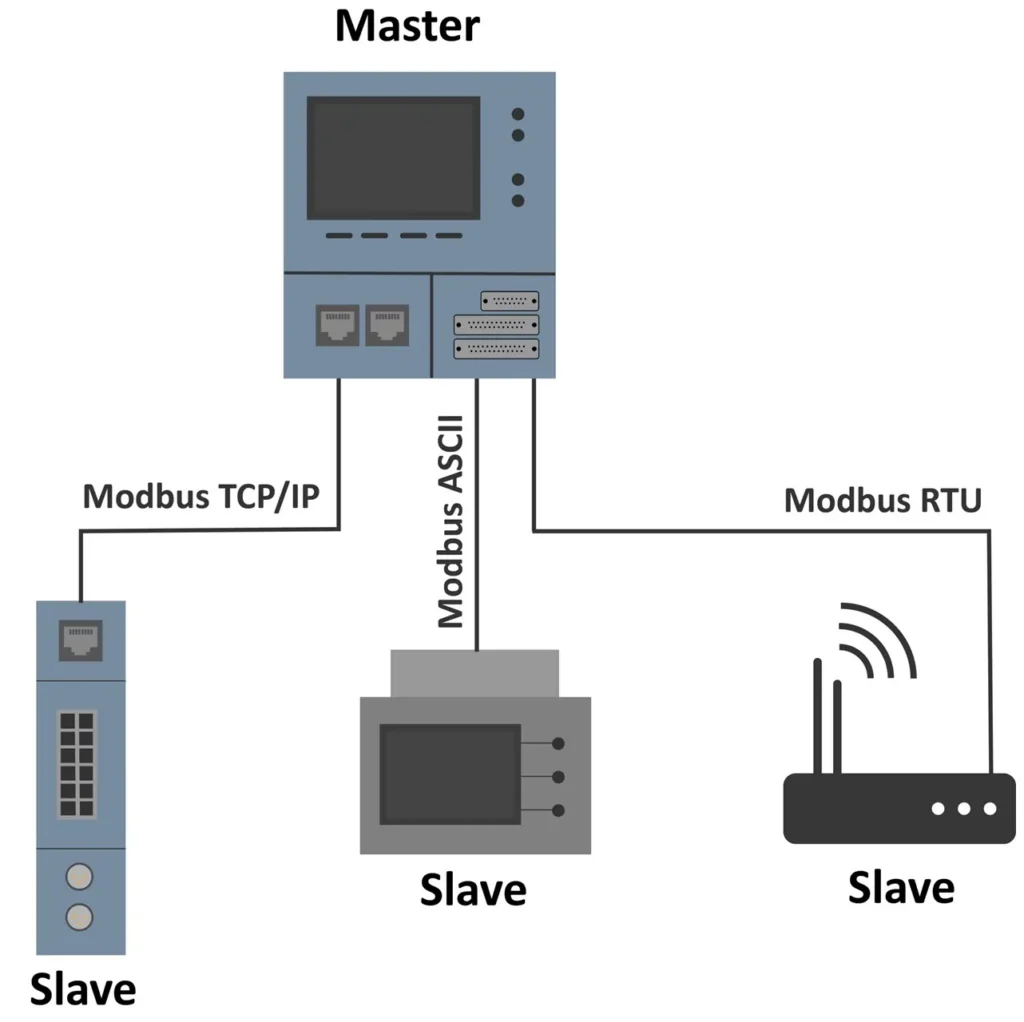
In this setup, the “Master” (often a PLC, HMI, or SCADA system) initiates all communication requests. It queries the “Slaves” (which could be a CNC controller, a remote I/O block, or a sensor) for data or sends commands to them. The Slaves simply respond to the Master’s requests; they do not talk to each other directly.
Modbus data is organized into four distinct tables, which map perfectly to the binary and analog nature of machine tools:
- Coils (0x): Read/Write binary bits (e.g., Start/Stop commands, coolant on/off).
- Discrete Inputs (1x): Read-only binary bits (e.g., limit switch states, door interlock status).
- Input Registers (3x): Read-only 16-bit words (e.g., temperature sensor readings, analog voltage).
- Holding Registers (4x): Read/Write 16-bit words (e.g., setting feed rates, spindle speeds, or reading macro variables).
Modbus RTU vs. Modbus TCP in the CNC World
When integrating Modbus into a CNC machine, you will generally encounter two physical layers:
1. Modbus RTU (Remote Terminal Unit):
This is the serial communication version, typically running over RS-232 or RS-485 wiring. RS-485 is incredibly popular in CNC environments because it is highly resistant to the electrical noise generated by massive spindle drives and servo motors. It allows for daisy-chaining multiple devices on a single twisted-pair cable.
2. Modbus TCP/IP:
This version encapsulates Modbus data within standard Ethernet TCP packets. As CNC machines have become more network-heavy (requiring high-speed data for 3D modeling and complex toolpaths), Ethernet has become the standard. Modbus TCP allows the CNC controller to communicate with plant-floor servers, HMIs, and cloud gateways using standard Cat5e/Cat6 cabling and standard network switches.
Why Use Modbus in CNC Manufacturing?
You might wonder why manufacturers use Modbus when proprietary protocols like Fanuc FOCAS, Siemens OPC UA, or Heidenhain DNC exist. The answer lies in universality, simplicity, and cost.
Proprietary protocols often require expensive licensing fees, specialized software, and deep knowledge of the specific CNC brand’s internal architecture. Modbus, being open and royalty-free, allows a Haas, Mazak, DMG Mori, and a custom-built machine to all speak the same basic language to a central PLC or SCADA system. It is the ultimate bridge for mixed-fleet manufacturing environments.
Real-World CNC Applications
How does Modbus actually look on the shop floor? Here are three common scenarios where it is the backbone of CNC communication:
1. Machine State Monitoring and OEE Tracking
To calculate Overall Equipment Effectiveness (OEE), plant managers need to know exactly what a machine is doing at any given second. Is it cutting? Is it idle? Is it in alarm?
By mapping the CNC’s internal PLC ladder logic to Modbus Holding Registers, an external gateway or PLC can poll the machine’s state every few seconds. For example, Register 40001 might represent the Machine State (0 = Idle, 1 = Running, 2 = Alarm). This data is then sent to an HMI dashboard to track cycle times and downtime.
2. Tool Wear and Breakage Detection
Tool management is critical in CNC machining. A broken tool can scrap a $10,000 aerospace component in milliseconds. Many modern CNC controllers allow for tool load monitoring. By exposing the spindle load meter data via Modbus Input Registers, an external predictive maintenance system can monitor the amperage draw of the spindle in real-time. If the load spikes suddenly (indicating tool breakage) or gradually increases over 50 parts (indicating tool wear), the system can trigger an alarm or automatically pause the machine.
3. Reading and Writing Macro Variables
Advanced CNC operators use “Macro Variables” (common in Fanuc and Haas controls) to store custom data, such as part counts, batch numbers, or custom offset adjustments. Through a Modbus-to-CNC gateway, a central MES (Manufacturing Execution System) can write a new batch number directly into a Macro Variable register via Modbus, ensuring the machine is always cutting the correct part program without manual operator entry.
Best Practices for Implementing Modbus in CNC Systems
While Modbus is simple, the harsh environment of a machine shop can introduce communication headaches. Here are best practices to ensure rock-solid communication:
- Respect the Electrical Noise: If using Modbus RTU over RS-485, always use shielded, twisted-pair cable. Ensure the shield is grounded at one end only to prevent ground loops. Keep communication cables routed in separate conduits from high-voltage servo power cables.
- Optimize Polling Rates: Don’t poll every register every millisecond. If you are monitoring spindle temperature, polling once every 5 seconds is plenty. Over-polling can choke the CNC controller’s CPU, potentially causing micro-stutters in the machining process or latency in G-code execution.
- Document Your Register Maps: The biggest nightmare in Modbus integration is a lost register map. Maintain a strict, version-controlled spreadsheet detailing exactly what every Coil and Register represents, including data types (e.g., is Register 40005 a 16-bit integer, or two registers making a 32-bit float?).
- Use Edge Gateways for IIoT: If you want to send Modbus data to the cloud for IIoT analytics, use an industrial Edge Gateway. The gateway reads the Modbus TCP/RTU data locally, translates it into a modern, lightweight protocol like MQTT, and securely sends it to the cloud.
The Limitations of Modbus in Modern CNC
Despite its enduring popularity, Modbus is not without its flaws, especially when viewed through the lens of modern cybersecurity and big data.
Security: Modbus was designed in an era when factory floors were physically secure and entirely disconnected from the internet. It features zero native encryption or authentication. If a malicious actor gains access to the network, they can easily read sensitive manufacturing data or, worse, send a command to unclamp a vise or disable a safety door interlock. For this reason, Modbus should never be routed directly across the public internet without a secure firewall or VPN in place.
Bandwidth: Modbus is relatively slow. It is fantastic for reading machine states, temperatures, and part counts. However, it is entirely unsuited for high-frequency data acquisition. If you want to capture raw vibration data from a spindle bearing at 20kHz to perform advanced AI-driven predictive maintenance, Modbus will bottleneck the system. High-frequency data requires specialized, high-speed protocols.
The Future: Modbus in the Age of Industry 4.0
As we move deeper into 2026 and beyond, the industrial landscape is rapidly adopting advanced protocols like OPC UA and TSN (Time-Sensitive Networking). So, is Modbus dead?
Far from it. Modbus has successfully transitioned from being the primary protocol to being the ultimate bridge protocol. While a brand-new, top-tier CNC machine might feature native OPC UA for semantic data exchange, the hundreds of legacy machines on the shop floor still rely on Modbus. Furthermore, many simple, low-cost sensors, barcode scanners, and ancillary equipment (like chillers and mist collectors) still ship with Modbus as their default communication method.
Modbus remains the reliable, workhorse protocol that connects the physical reality of the CNC machine to the digital reality of the enterprise network.
Conclusion
The Modbus communication protocol may be a relic of the late 1970s, but its simplicity, openness, and reliability have cemented its place in the modern CNC machine shop. Whether you are pulling spindle load data to prevent tool breakage, tracking OEE via an HMI, or integrating a legacy milling machine into a smart factory network, Modbus provides the vital bridge between iron and information.
By understanding its architecture, respecting its physical limitations, and implementing it with shop-floor best practices, manufacturers can unlock the full potential of their CNC equipment, turning isolated machines into a synchronized, data-driven powerhouse.
Are you currently integrating Modbus into your CNC machines or struggling with shop-floor communication noise? Share your experiences, tips, or questions in the comments below!


