
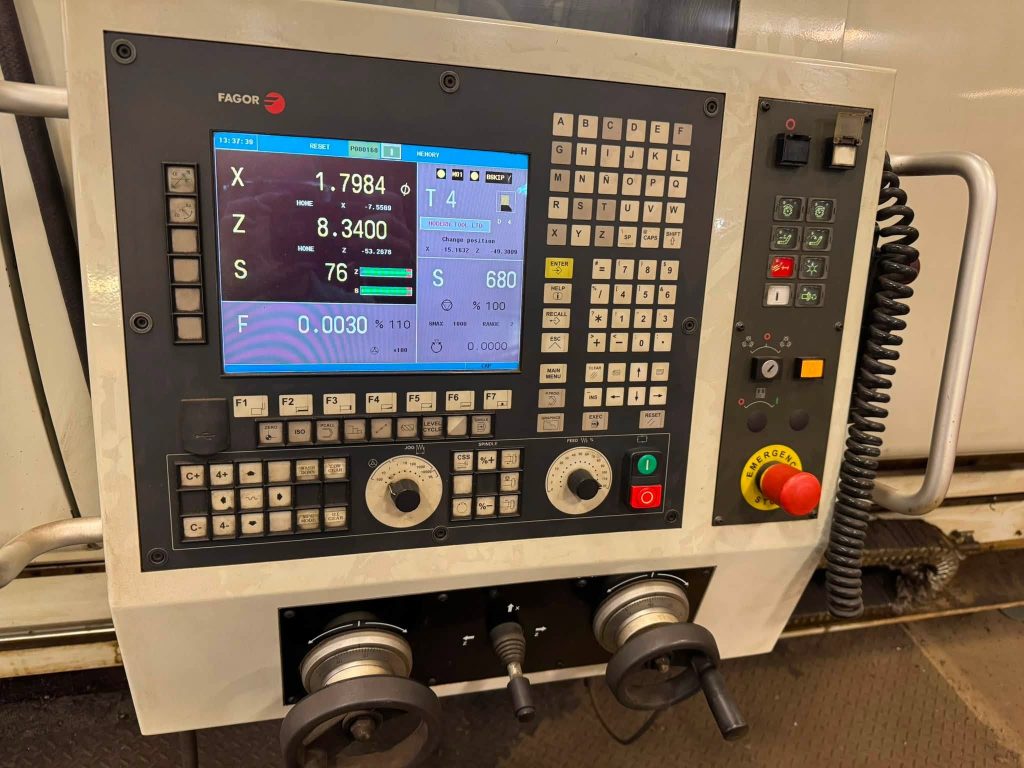
If you’ve spent any time in a mid-to-large-sized CNC machine shop, you’ve likely encountered the Fagor 8055. Specifically, the 8055 TC (Turning Center) is a legendary workhorse in the industry. Whether it’s running on a 2-axis lathe, a multi-axis turning center with a Y-axis, or a complex mill-turn machine, the 8055 TC is built to handle it.
But how does this control actually work under the hood? How does it manage complex turning cycles, live tooling, and C-axis synchronization?
1. The Core Architecture: Modular and Robust
The 8055 TC isn’t just a screen and a keyboard; it’s a highly modular, industrial-grade computer.
- The Central Unit: The brain of the operation. It houses the CPU (which handles interpolation, graphics, and editing), the Axes Module (which processes feedback and outputs analog/digital signals), and the I/O modules.
- The Built-in PLC: One of the 8055’s strongest features is its integrated Programmable Logic Controller (PLC). The PLC handles all the machine-builder logic: tool changer sequencing, coolant pumps, chuck clamping, and safety interlocks. If your machine is throwing an error related to a physical action (like a turret failing to index), the PLC program is usually where you’ll find the answer.
- Sercos Interface: Modern 8055 TCs use the Sercos digital bus to communicate with servo drives. This allows for high-speed, noise-free data exchange for spindle and axis control.
2. Programming: ISO and Conversational
The 8055 TC is famous for offering two distinct ways to program, making it a favorite for both CAM programmers and shop-floor machinists.
Conversational Programming
Fagor’s Conversational mode allows operators to program parts directly at the machine without writing G-code. You simply answer prompts (e.g., “What is the starting diameter?”, “What is the final diameter?”, “What is the cutting pass?”). The CNC calculates the tool paths, passes, and feedrates automatically. It is incredibly fast for simple turning, facing, and threading jobs.
ISO (G-Code) Programming
For complex contours or programs generated by CAM software, the 8055 TC supports full ISO programming. It handles standard G-codes, subroutines, parametric programming (using local and global parameters), and macro variables.
3. Mastering the Spindle, C-Axis, and Live Tooling
What separates a standard lathe from a Turning Center (TC) is the ability to mill, drill, and tap off-center. The 8055 TC manages this through brilliant parameter setups.
The Main Spindle
The spindle can be controlled via an analog voltage (±10V) or BCD code.
- Open Loop (M03/M04/M05): Standard speed control.
- Closed Loop (M19): Spindle orientation. The 8055 uses the spindle encoder to lock the spindle at an exact angle, which is mandatory for rigid tapping or C-axis operations.
The “C” Axis and Live Tooling
When you need to drill a cross-hole or mill a flat, the spindle becomes a rotary axis (the C-axis).
- The 8055 TC can seamlessly transition the spindle from a rotating drive to a positioned rotary axis.
- Live Tooling: Driven tools are activated via M45 (or G28, depending on machine parameters). The CNC manages the speed and feedrate of the live tool independently of the main spindle, allowing for complex off-center machining.
4. Turning Canned Cycles: The Time Savers
The 8055 TC is packed with specialized turning canned cycles that automate repetitive calculations. Instead of writing 50 lines of code for a roughing pass, you use a cycle:
- G84 / G85: Turning and Facing canned cycles with arcs.
- G86 / G87: Longitudinal and Face threading cycles.
- G88 / G89: Grooving cycles along the X or Z axis.
- G68 / G69: Roughing canned cycles that automatically calculate the step-down passes based on your defined profile and cutting depth.
Pro Tip: When using these cycles, ensure your tool nose radius and location code (T-code) are correctly defined in the tool offset table, or the 8055 will throw a geometry error!
5. Tool Management
The 8055 TC uses three distinct tables to manage tooling:
- Tool Table: Defines the tool number, family code, and tool life (in minutes or parts).
- Tool Offset Table: Stores the geometry (X, Z, Radius, Nose orientation).
- Tool Magazine Table: Maps the physical pocket in the turret to the tool number.
The control supports both Random and Non-Random tool changers. If you have a non-random turret (where Tool 1 always goes back to Pocket 1), the CNC tracks this automatically. It also features Tool Life Monitoring, automatically alerting the operator or swapping to a backup tool when a tool reaches its programmed lifespan.
6. Practical Troubleshooting: Decoding Common Errors
Because the 8055 TC integrates the CNC, PLC, and drives, errors can come from anywhere. Here is a practical guide to some common 8055T/TC error codes and how to fix them:
- Error 2000 (External Emergency Activated):
- What it means: The physical E-Stop circuit is open, or the PLC mark M5000 is set to 0.
- Fix: Check the physical E-Stop buttons, safety door switches, and the PLC ladder logic for the safety chain.
- Error 2010 / 2001 (Spindle / Axis Feedback Error):
- What it means: The CNC is not receiving pulses from the encoder.
- Fix: Check the encoder cables for breaks. Ensure the shield is grounded only at the CNC end. If using differential signals, check the
FBACKALparameter.
- Error 1033 (Incorrect Range Change):
- What it means: The CNC asked the PLC to change spindle gears (M41-M44), but the PLC didn’t confirm the gear was selected.
- Fix: Check the physical proximity switches on the gearbox and verify the PLC inputs (GEAR1 through GEAR4).
- Error 1015 / 1016 (Tool not defined / Not in magazine):
- What it means: The program called for a tool that doesn’t exist in the Tool Table or isn’t assigned to a pocket in the Magazine Table.
- Fix: Check your tool setup screens. Ensure the tool is defined and assigned to a valid pocket.
- Error 1182-1190 (Axis Following Error Limit Overrun):
- What it means: The axis is lagging too far behind the commanded position.
- Fix: This is usually mechanical or drive-related. Check for a loose servo motor coupling, a broken ballscrew, or a misadjusted servo drive gain.
Final Thoughts
The Fagor 8055 TC remains a highly capable, versatile control. Its blend of shop-floor conversational programming, robust ISO capabilities, and deep PLC integration makes it a favorite for custom machine builders and production shops alike.
By understanding how it manages tool data, spindle synchronization, and canned cycles, operators and programmers can squeeze maximum efficiency out of this legendary machine.


