
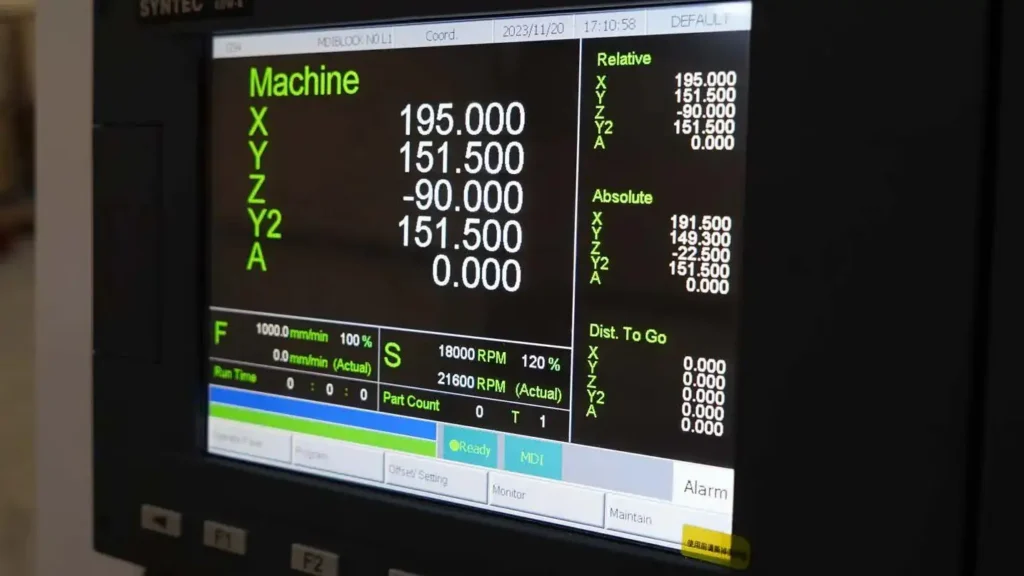
Walk into a modern machine shop, and you’ll likely see a blend of cutting-edge technology and time-tested machinery. Amid the hum of spindles, coolant mist, and precision motion, one component stands out for its quiet evolution: the monitor used in CNC (Computer Numerical Control) machines. Far more than a simple display, this interface is the window through which operators command metal, design, and motion translating digital instructions into physical reality. Over the decades, CNC monitors have evolved from bulky cathode ray tubes (CRTs) to sleek, responsive touchscreens, yet each generation reflects the priorities of its era: reliability, clarity, and seamless integration with control systems.
The Role of the Monitor in CNC Operations
In a CNC machine, the monitor isn’t just for show it’s a critical part of the human-machine interface (HMI). Operators use it to:
- View and edit G-code (the programming language that directs tool paths),
- Monitor real-time axis positions and spindle speeds,
- Diagnose errors or alarms,
- Simulate tool paths before cutting,
- Navigate control menus for setup, calibration, and maintenance.
Because CNC environments are often noisy, vibration-prone, and filled with electromagnetic interference (EMI) from motors and drives, these monitors must be rugged, responsive, and highly reliable. A flickering or delayed display isn’t just inconvenient it can lead to costly errors or machine crashes.
The CRT Era: The Original CNC Monitor

From the 1970s through the early 2000s, CRT (Cathode Ray Tube) monitors dominated CNC control panels. Unlike consumer TVs or office monitors, CNC CRTs were engineered for industrial use:
- Monochrome displays (typically green, amber, or white phosphor) reduced visual fatigue during long shifts.
- High electromagnetic shielding protected against interference from servo drives and power electronics.
- Proprietary connectors and timing ensured compatibility with CNC controllers from manufacturers like Fanuc, Siemens, Mitsubishi, and Heidenhain.
CRTs offered distinct advantages for CNC applications:
- Resolution agnosticism: They could display low-resolution signals (e.g., 640×480 or even 320×200) with perfect clarity no pixel scaling or blurriness.
- Near-zero input lag: Electron beams responded instantly, crucial for real-time feedback during manual jogging or toolpath simulation.
- Durability: With no fixed pixels or backlights to fail, CRTs often outlasted the machines they were installed in.
Many shops still operate CNC mills and lathes with original CRT monitors. For these users, the old adage holds true: “If it ain’t broke, don’t fix it.” Replacing a CRT isn’t just about swapping a screen it often means rewiring, recalibrating, or even upgrading the entire control system, which can cost tens of thousands of dollars.
The Limitations of CRTs in Modern Contexts
Despite their strengths, CRTs come with significant drawbacks:
- Size and weight: A typical CRT monitor weighs 30–50 pounds and protrudes deeply from the control panel, limiting workspace ergonomics.
- Power consumption: CRTs draw far more electricity than modern displays and generate noticeable heat.
- Obsolescence: CRT production ceased globally by the mid-2000s. Replacement tubes, deflection yokes, and high-voltage components are now scarce and expensive.
- Safety concerns: Operating at 10,000–30,000 volts, CRTs pose risks of electric shock or implosion if mishandled.
As shops modernize or expand, the CRT’s limitations become harder to ignore especially when training new operators accustomed to intuitive, graphical interfaces.
The Rise of LCD and Flat-Panel Displays
By the late 1990s and early 2000s, LCD (Liquid Crystal Display) technology began replacing CRTs in many applications. Initially, industrial LCDs faced skepticism:
- Early panels suffered from slow response times, causing motion blur during toolpath animation.
- Fixed native resolution meant low-res CNC signals appeared blurry or required complex scaling.
- Poor viewing angles and sensitivity to temperature extremes made them less reliable in shop-floor conditions.
However, rapid advancements changed the game. Modern industrial LCDs now feature:
- High brightness (1000+ nits) for visibility under shop lighting,
- Wide temperature tolerance (-20°C to +60°C),
- Anti-glare and anti-reflective coatings,
- Resistive or capacitive touchscreens for glove-friendly operation,
- Robust metal housings with IP65 ratings for dust and coolant resistance.
Manufacturers like Fanuc, Siemens, and Haas began integrating ruggedized LCD panels directly into their next-generation CNC controls. The shift wasn’t just about aesthetics it enabled richer graphical interfaces, 3D toolpath visualization, and integration with networked shop-floor systems.
Retrofitting Legacy Machines: Bridging Old and New
For shops running older CNC machines, full system upgrades aren’t always feasible. This has spurred a niche but vibrant market for CNC monitor retrofits. Solutions include:
- CRT-to-LCD Conversion Kits:
These replace the CRT with a modern LCD panel while retaining the original mounting and control layout. Built-in scan converters translate analog VGA or RGB signals into digital formats compatible with the LCD. - Embedded Emulators:
Devices like the Arcor CRT Emulator or Raspberry Pi–based systems digitize the original video signal, clean it up, and output it via HDMI—often with simulated phosphor glow or scanlines for nostalgic fidelity. - Industrial Panel PCs:
Some shops bypass the original display entirely, installing a sealed industrial PC running modern CNC software (e.g., LinuxCNC or Mach4) that mimics the original interface while adding new capabilities like USB, Ethernet, and file management.
These retrofits require technical know-how but offer a cost-effective middle ground extending machine life without sacrificing usability.
Touchscreens and the Modern CNC Interface
Today’s high-end CNC machines feature full-color, multi-touch displays that rival consumer tablets in responsiveness. But industrial touchscreens are built differently:
- Projected capacitive (PCAP) or resistive touch layers work with gloves or oily fingers.
- No moving parts reduce failure points.
- On-screen soft keys replace physical buttons, allowing dynamic interface changes based on operational mode.
More importantly, modern monitors are part of a connected ecosystem. They may display:
- Live feeds from machine cameras,
- Tool life tracking dashboards,
- Remote diagnostics from OEM support centers,
- Integration with MES (Manufacturing Execution Systems) or cloud-based production monitoring.
This transformation turns the CNC monitor from a passive viewer into an active command center blending real-time control with data-driven manufacturing.
Why Some Shops Still Prefer CRTs (and Why That’s Okay)
Despite the march of progress, many veteran machinists swear by their CRTs. Reasons include:
- Text clarity: Monochrome phosphor displays render alphanumeric codes with unmatched sharpness.
- Consistency: No color calibration, no backlight dimming over time just reliable output.
- Familiarity: Decades of muscle memory make navigating a CRT-based menu faster than learning a new system.
- Reliability: In EMI-heavy environments, analog CRTs often outperform sensitive digital panels.
This isn’t mere nostalgia it’s pragmatism. In a world where machine uptime equals revenue, proven technology holds immense value.
The Future: Beyond the Screen
Looking ahead, the role of the CNC monitor may evolve further. Emerging trends include:
- Augmented Reality (AR) overlays via smart glasses, showing toolpaths or measurements in the operator’s field of view.
- Voice-controlled interfaces for hands-free operation.
- Gesture recognition for navigating menus without physical contact useful in cleanrooms or sterile environments.
Yet even as technology advances, the core principle remains unchanged: the CNC monitor must serve the operator, not the other way around. Whether glowing green in a 30-year-old lathe or displaying 3D simulations on a 4K touchscreen, its purpose is to make precision machining intuitive, safe, and efficient.
Conclusion: A Display of Engineering Evolution
The monitor used in CNC machines is more than a screen it’s a mirror of technological progress, industrial priorities, and human adaptation. From the warm glow of a CRT in a dimly lit shop to the crisp icons of a modern HMI, each generation tells a story of innovation constrained by real-world demands: durability, clarity, and reliability.
As we move toward smarter, more connected factories, it’s worth remembering the humble CRT that once guided the first wave of digital manufacturing. And for those still keeping vintage machines alive, the flicker of that old green screen isn’t a sign of obsolescence it’s a beacon of enduring craftsmanship.
In the end, whether it’s a cathode ray tube or a capacitive touchscreen, the best CNC monitor is the one that helps the operator make better parts, faster, and with confidence. And that’s a standard no amount of pixels can replace.


